
Welcome to Beam Water Meter Self-Help
Use the short codes below to easily query your water meter information.
Available Short Codes
00+Enter
The screen will update with the latest data from your meter.
01+Enter
The screen will display your total water consumption in cubic meters
06+Enter
Total amount of water you have bought
07+Enter
The screen will display your remaining water credit.
20-digit Token + Enter
Enter token received via SMS to recharge
65+Enter
Query the first five digits of the CIU ID
66+Enter
Query the last six digits of the CIU ID
Token Inquiries
These are the response from your CIU(Customer Interface Unit), when a Token is entered

Accepted
Water purchase TOKEN is correct. It will be accepted and “accept” will be displayed.

Rejected
Water purchase TOKEN is incorrect. It will be rejected and “reject” will be displayed.

Used
When “used” is displayed, it means the TOKEN has been used.

Old
When “old” is displayed, it means TOKEN is out of date.

Missing Token
Indicates that one or more tokens are missing.
Meter Mismatch
Indicates meter ID is different.
Abnormal Detection Errors
Below are common error messages and their solutions.
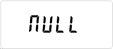
Null

Valve Open

Valve Close

Low Battery
Magnetic Tamper Solution Remove the magnet, then enter the clear steal Token again |  |
Battery Issue Solution The battery power cable is abnormal or the battery power is low.If the battery connector is damaged, even when entering the tamper-clear token, the meter will repeatedly display an error. Solution:Reinsert the battery or replace it with a new one, and then input the Token to clear the water steal |  |
Blocked Motor Drive Solution Remove the foreign matter in the motor to ensure the normal operation of the motor, and then input the clean steal Token |  |
Valve blocked Solution Remove the impurities in the water meter valve, such as stones, metal foreign bodies, or replace the battery, and then input the clean steal Token | 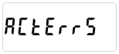 |
No/Low Battery Solution The customer did not insert the battery, or the battery power was too low. In this case, if a recharge is attempted, the water meter will display error 10 | 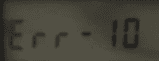 |
Wrong Meter ID Solution Check with 65+enter and 66+enter to see if the meter id is same on the LCD with printed on CIU. Then use 99+meter id printed on CIU+enter, it will be same and then use 00+enter to update data | |
Total Usage Solution The total number of water units consumed by the household or property. | 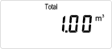 |
Total Units Purchased Solution The cumulative number of water units bought and loaded onto the meter since it was installed. | 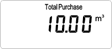 |
Remaining Units Solution The current balance of water units left on the meter, representing how much water the user can still consume before needing to recharge. | |